MailMeQuiet started with one simple wish: more peace.
Your phone already runs enough of your life. “Focus mode” sounds great — but once it’s over, all that chaos is still waiting in your inbox.
Phishing, fake stuff, and everything else: open the wrong email and suddenly even more spam starts flooding in. Newsletter with a coupon code? Sure — but not right now. Website updated? Okay…! Sensitive email — and someone’s looking over your shoulder? Bug in a loop — 1,001 emails suddenly come in…
So I started building something for myself. At first it was a messy script that kept growing and growing. That turned into the IMAP silencer — MailMeQuiet.
It was never about “better email management” or problem movement. It was about something much simpler:
Less
distraction
Less
decisions
Less
“just quickly” moments
The Problem
Those little interruptions.
Every few minutes. Again and again. And if you work in IT, you also get system emails on top: important — but not right now.
📬
See the email
A new message pops up. Your focus breaks. You look.
01
🗑
Delete the email
No value. Get rid of it. But that decision just cost you three seconds of context.
02
📁
Move the email
Archive it somewhere. Again. And ten minutes later, the same thing happens all over again.
03
Hours
lost every month
Days
wasted every year
Focus
the most expensive thing you lose
All those tiny distractions cost you more than you think.
Because that’s exactly what adds up.
The Solution
MailMeQuiet takes care of exactly that for you.
It decides what matters before you even look — and what’s just getting in your way.
// Before
✗You open your inbox
✗47 emails are waiting for your attention
✗You sort, filter, decide
✗Focus is gone. Again.
// With MailMeQuiet
✓MailMeQuiet filters before you look
✓Only 3 emails actually need you
✓You decide when to respond
✓Focus stays focus.
Controlled Muting
System emails, CI notifications, newsletters, spam — systematically recognized and quietly managed.
Focus Inbox
Only what matters lands in your field of view. Everything else still exists — you’ll just see it when you’re ready.
Works Across Devices
Rules not inside your mail client — right at the IMAP-level. Works everywhere, on every device, ready to use immediately.
Private by Design
No content storage. Everything happens encrypted. No third-party provider integrations. Processing stays where it belongs.
Fits Your Existing Workflow
No new client, no migration. MailMeQuiet works with the email setup you already have.
Automation & Webhooks
Don’t just react to emails — trigger actions. Connect your inbox to your systems.
Instant Cleanup
Thousands of emails — gone or sorted in seconds. Your inbox, finally quiet.
MailMeQuiet keeps improving — quieter, smarter, more precise.
No noise. No marketing show.
7. Mai
Rules can now mark emails as read
– You can choose per rule whether matching emails should be marked as read after processing.
Useful for newsletters, auto-replies, or known system emails that should be handled cleanly without staying unread in your inbox.
6. Mai
Live chat for advice, support, and quick questions
– You no longer have to figure out which rules, filters, or settings fit your inbox on your own.
If you need support, have questions, or just want quick guidance, you can now reach us directly via live chat.
28. April
More account security, because your protection comes first for us
– We have further improved account protection so you can use MailMeQuiet with even more confidence.
The new 2FA protection adds more account security and gives you extra control over your access.
This keeps your account even better protected without making sign-in more complicated.
15. April
New zen dark mode
– Reduced to what matters. Soft contrasts, fewer distractions.
So your inbox doesn’t just stay quiet — it feels quiet.
11. April
New filter presets, smarter starting points, and a faster rule-building experience
– With the new presets, you no longer have to build complex filters from scratch, but can start immediately from thoughtfully designed templates.
On top of that, we added smarter entry points, smoother flows, and many small UI and UX improvements so you can get to a working rule much faster.
8. April
While everything else gets more expensive, we lowered our prices
– The global economy is spiraling, costs keep rising everywhere, and we decided to do the exact opposite.
All plans are now cheaper, because powerful mail automation should not become a luxury.
30. März
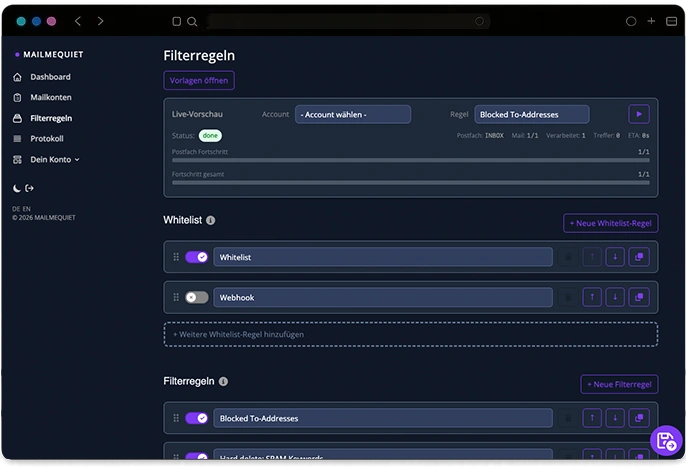
Whitelist and filters clearly separated
– Protection rules and actual filters are now structured more clearly.
More clarity, less confusion, and faster correct setup.
28. März
Provider match instead of technical chaos
– Detect your mail provider faster and set everything up much more easily.
Less searching, fewer errors, and ready to go sooner.
26. März
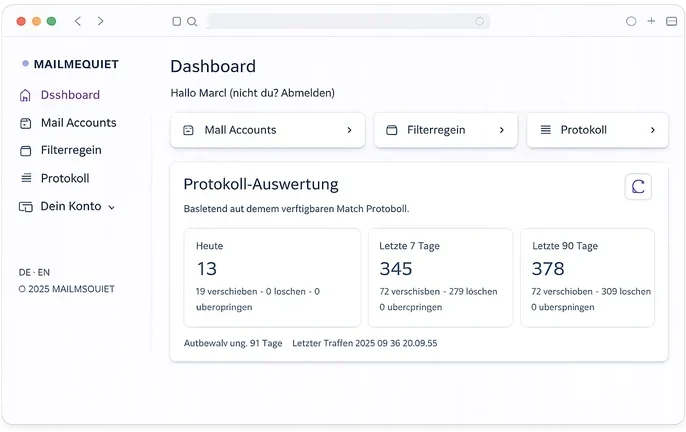
New match analytics dashboard
– See at a glance how many emails were detected today and in recent days. Clear, easy to understand, and pulled directly from your log.
23. März
New security intelligence rule
– Detects when a sender sounds familiar, but the address does not match.
21. März
Webhooks introduced
– So rules can now trigger actions beyond your inbox.
20. März
Improved match log
– Understand more clearly why emails were filtered.
MailMeQuiet is more than just filtering.
Detects. Reacts. Communicates.
For example, even with webhooks.
Frequently Asked Questions
Straight answers. No marketing fluff.
What is MailMeQuiet?
With MMQ, you can create rules to calm and organize your inbox with intention. Nothing is left to chance. You can move, delete, or mark emails as read automatically.
Does MailMeQuiet read my emails?
For classification, metadata, subject lines, and optionally message content are analyzed. No content is stored or shared. No one reads your emails. Privacy isn’t a feature — it’s the foundation.
Does MailMeQuiet modify my emails?
No. Emails remain unchanged. MailMeQuiet only decides where, when, and if you see them — it never alters the emails themselves.
Which email clients are supported?
MailMeQuiet works independently in the background at the protocol level (IMAP). You can continue using Outlook, Apple Mail, Thunderbird, or any other client.
How do I activate MailMeQuiet?
No technical changes to domains, DNS, or mail servers are required. Just sign up, connect your IMAP account to MMQ — and you’re done.